Showing posts with label windows. Show all posts

Tuesday, 5 September 2017

HOW TO SETUP KALI DOCKERS ON WINDOWS 10

HOW TO SETUP Kali Linux in Docker on Windows 10


What is Docker?

Docker is an open source technology that lets you create, run, test, and deploy distributed applications within software containers. Docker allows you to deploy applications quickly, reliably and stably in any environment.

Why use Docker?

Because the containers are portable, convenient and fast. With Docker, we can create an image and use it as the basis for each environment we create. For example, we download the basic container Kali Linux, which does not come with the tools installed. Let�s see that from this basic container, can go installing the tools I need and then save with a new name, without the original container, to be, affected.
Thus being able, from the base image, create a container with tools for forensics, a container with tools to PenTest web, for example.

Install the Metasploit Framework (IN WINDOWS 10 DOCKERS) CLICK HERE

my thought 
The next best thing is Containers. In the Windows world, this requires Windows 10 Anniversary Edition+. You'll be able to enable Containers, Install Docker, and pull a Kali Linux image all in 10 minutes or less (download speeds may vary ).

FOLLOW THESE STEPS

Run (ctrl+r) 


TYPE HERE optionalfeatures AND PRESS "OK"

NOW HERE YOU WILL SEE CONTAINERS OPTION JUST MAKE SURE OPTION IS OFF 

DOWNLOAD DORKER FROM HERE -  https://docs.docker.com/docker-for-windows/install/#what-to-know-before-you-install  (CHOOSE STABLE )


Install Docker for Windows(IMPORTANT FILE -DOWNLOAD FROM HERE - download.docker.com ) 

1>Double-click Docker for Windows Installer.exe to run the installer.

If you haven�t already downloaded the installer (Docker for Windows Installer.exe), you can get it from download.docker.com

It typically downloads to your Downloads folder, or you can run it from the recent downloads bar at the bottom of your web browser.

2> Follow the install wizard and proceed with the install. You will be asked to authorize Docker.app with your system password during the install process. Privileged access is needed to install networking components, links to the Docker apps, and manage the Hyper-V VMs. 

3>Click Finish on the setup complete dialog to launch Docker.


FOR MORE INFO WINDOWS DORKER CLICK HERE - HERE

BACK TO MAIN TOPIC

Once that completes, follow these instructions to install docker: https://docs.docker.com/docker-for-windows/install/. Grab the Stable channel Windows MSI and install it. Once you get it to install, you need to log out and log back in. NOTE: Although Docker stated it just needed a log-out/log-in, in order for the Docker service to run on my machine it required a reboot.

ONCE YOU LOGGIN BACK YOU GET notifications, you should get a "Docker is startinG"

Pull Official Kali Linux Docker Image

Open up your favorite command line interface (CLI). Then type docker pull kalilinux/kali-linux-docker. This will pull the image from the Docker Store.


 Now, let us enter an interactive bash session with that image by typing docker run -t -I kalilinux/kali-linux-docker /bin/bash


We are now in our fresh install of Kali in WINDOWS 10. This install is meant to be the minimal, you need to grab the packages you actually care about. This helps keep the image small but does require a good Internet connection to get up and running.
Before installing any package, let's upgrade our Kali Linux and remove all packages we no longer need via apt update && apt full-upgrade && apt auto-remove && apt-autoclean


HOW TO Install the Metasploit Framework (IN WINDOWS 10 DOCKERS)

HOW TO Install the Metasploit Framework (IN WINDOWS 10 DOCKERS)


COMMAND -

FOR INSTALLING METASPLOIT IN WINDOWS 10 DOCKERS
apt install metasploit-framework ruby
OR
 apt-get install metasploit 

start up the PostgresSQL database -


PROOF


Friday, 25 August 2017

How To Download Instagram Videos/Photos to Computer

Download Instagram Videos to Computer/PC

  • Log in to your Instagram Account using any web browser like Google Chrome, Mozilla Firefox etc.
  • Get the URL of your video by clicking download instagram videos  and by pressing View Video page.
  • Right-click on the video and Select �Inspect Element�.
  • You will see a link in a <div> tag after src, click it.
  • Now your video will start playing in a new tab. Then right click anywhere on the screen and select Save Video Asdownload Instagram videos
  • Your video will now start downloading.
  • You�re done

Download Instagram Videos to Computer Easily

  • Follow first 3 steps from the above procedure and open dredown website.
  • Paste the copied URL in the text box provided
  • Press Dredown!
    download instagram videos from PC
  • You�re done.


Wednesday, 23 August 2017

Subtitle-to-speech program


Subtitle-to-speech program

A program to turn movie subtitles (SRT) to speech using the Windows narrator
other formate to convert srt from these site (example .ass to srt) 
https://subtitletools.com/convert-to-srt
https://lab.sorz.org/tools/asstosrt/


In order to rid myself of the subconscious addiction to western
cinema, I started watching a lot of movies from other countries,
especially Asian countries. 

Most of these films have subtitles submitted by fans - way much
cooler than voice-overs. The problem I have with reading subtitles
while in bed stems from the fact that I wear glasses... I am a
programmer so I decided to tackle the issue of subtitles-to-speech
once and for all. What luck, Vista has a better voice for the narrator!


1. The subtitle-to-speech window


2. Click the Play or Browse-for-Folder button to specify the location of the subtitle file (Subrip only)


3. Locate the subtitle file...


4. If a video has been found (AVI) matching the subtitle file, you will be asked if you want to launch the video file in your default media player


5. The subtitles have been parsed from the file specified as well as the last subtitle time


6. If you had opted to open the video file as well, the movie starts playing and you can see how the program works


7. Since the video and the program are in no way connected, you need to manually adjust the timing (scrub...). Just click on the running time label to open the scrub dialog


8. If you are using Videolan's VLC, you can turn off the subtitles, by clicking the appropriate menu entries as shown.

Download the program 64 KB win vista tested Media fire

Saturday, 22 July 2017

Firefox Add-ons a Hacker Must Have

11 Firefox Add-ons a Hacker Must Have


1. Tamper Data
Tamper data is a great tool to view and modify HTTP/HTTPS headers and post parameters. We can alter each request going from our machine to the destination host with this. It helps in security testing web applications by modifying POST parameters. It can be used in performing XSS and SQL Injection attacks by modifying header data.
Add Tamper data to Firefox:
https://addons.mozilla.org/en-us/firefox/addon/tamper-data/

2. Firebug
Firebug is a nice add-on that integrates a web development tool inside the browser. With this tool, you can edit and debug HTML, CSS, and JavaScript live on any webpage to see the effect of changes. It helps while analyzing JS files to find XSS vulnerabilities. It�s a very helpful add-on for finding DOM based XSS for security testing professionals.
Add Firebug to your browser:
https://addons.mozilla.org/en-US/firefox/addon/firebug/

3. Hackbar
Hackbar is a simple penetration tool for Firefox. It helps in testing simple SQL injection and XSS holes. You cannot execute standard exploits but you can easily use it to test whether or not vulnerability exists. You can also manually submit form data with GET or POST requests. It also has encryption and encoding tools. Most of the time, this tool helps while testing XSS vulnerability with encoded XSS payloads. It also supports keyboard shortcuts to perform various tasks. I am sure most people in the security field already know about this tool. Hackbar is mostly used in finding POST XSS vulnerabilities because it can send POST data manually to any page you like. With the ability to manually send POST form data, you can easily bypass client side validations. If your payload is being encoded at client side, you can use an encoding tool to encode your payload and then perform the attack. If the application is vulnerable to XSS, I am sure you will find the vulnerability with the help of the Hackbar add-on to Firefox browser.
Add Hackbar to Firefox:
https://addons.mozilla.org/en-US/firefox/addon/hackbar/

4. Cookies Manager 
Cookie Manager is one of the greatest tools ever created. Using this tool you can actually play with cookies. You can alter almost every cookie using this tool. You can use Cookies Manager to view, edit, and create new cookies. It also displays extra information about cookies, allowing you to edit multiple cookies at once and backup/restore them.
Add Cookies Manager to Firefox:
https://addons.mozilla.org/en-US/firefox/addon/cookies-manager-plus/

5. NoScript
No Script add-on is greatness beyond imagination. With this tool, you can monitor each and every script running on a website; you can block any of the scripts and see what each script actually does. But this add-on is for experts, newbies will face problems using this. Note: If you are testing XSS, HTTPS header modifications, or Injection attacks on any website, you need to disable this plugin first because it will block your efforts.
Add NoScript to Firefox:
https://addons.mozilla.org/en-us/firefox/addon/noscript/

6. Grease Monkey
Grease Monkey is the counter part to NoScript, its function is the exact opposite of Noscript. We use Noscript to block scripts and GreaseMonkey to run them. It allows you to customize the way a web page displays or behaves by using small bits of JavaScript. 
Add Grease Monkey to Firefox:
https://addons.mozilla.org/en-US/firefox/addon/greasemonkey/

7. User Agent Switcher

User Agent Switcher adds a one-click user agent switch to the browser, along with a menu and tool bar button. Whenever you want to switch the user agent, use the browser button. User Agent add-on helps in spoofing the browser while performing an attack.
Add User Agent Switcher to Firefox:
https://addons.mozilla.org/en-US/firefox/addon/user-agent-switcher/

8. CryptoFox
CryptoFox is an encryption or decryption tool for Mozilla Firefox. It supports most of the available encryption algorithms so you can easily encrypt or decrypt data with supported encryption algorithms. This add-on comes with dictionary attack support to crack MD5 cracking passwords. Although it hasn�t always had great reviews, it works satisfactorily.
Add CryptoFox to Firefox:
https://addons.mozilla.org/en-US/firefox/addon/cryptofox/

9. SQL Inject Me
SQL Inject Me is another nice Firefox add-on used to find SQL injection vulnerabilities in web applications. This tool does not exploit vulnerabilities but displays their existence. SQL injection is one of the most harmful web application vulnerabilities, it can allow attackers to view, modify, edit, add, or delete records in a database. This tool sends escape strings through form fields and searches database error messages. If it finds a database error message, it marks the page as vulnerable. Hackers can use this tool for SQL injection testing.
Add SQL Inject Me to Firefox:
https://addons.mozilla.org/en-us/firefox/addon/sql-inject-me/ 

10.  XSS ME
Cross Site Scripting is the most common web application vulnerability. This add-on is incredibly useful for detecting XSS vulnerabilities in web applications. XSS-Me is used to find reflected XSS vulnerabilities from a browser. It scans all forms of the page, and then performs an attack on selected pages with pre-defined XSS payloads. After the scan is complete, it lists all the pages that rendered a payload, and may be vulnerable to XSS attack. Then, you can manually test the web page to determine whether or not the vulnerability exists.
Add XSS ME to Firefox:
https://addons.mozilla.org/en-us/firefox/addon/xss-me/

11.  Passive Recon
Last but not the least, Passive Recon is an information gathering tool.
Passive Recon provides information security professionals the ability to perform �packetless� discoveries of target resources utilizing publicly available information. It gathers information in the same manner as DnsStuff tool, available on backtrack.

Add PassiveRecon to Firefox:
https://addons.mozilla.org/en-US/firefox/addon/passiverecon/


That�s all for today. I hope you�re enjoying your journey towards becoming a Professional Hacker. Have fun! Keep learning.


Thursday, 22 June 2017

Website Password hacking using WireShark

ets try this on a simple website. I will hide part of the website name (just for the fact that they are nice people and I respect their privacy.). For the sake of this guide, I will just show everything done on a single machine. As for you, try it between two VirtualBox/VMWare/Physical machines.
p.s. Note that some routers doesn�t broadcast traffic, so it might fail for those particular ones.

Step 1: Start Wireshark and capture traffic

In Kali Linux you can start Wireshark by going to
Application > Kali Linux > Top 10 Security Tools > Wireshark
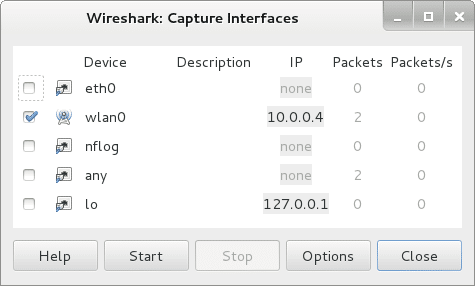
In Wireshark go to Capture > Interface and tick the interface that applies to you. In my case, I am using a Wireless USB card, so I�ve selected wlan0.
Website Password hacking using WireShark - blackMORE Ops - 1
Ideally you could just press Start button here and Wireshark will start capturing traffic. In case you missed this, you can always capture traffic by going back to Capture > Interface > Start
Website Password hacking using WireShark - blackMORE Ops - 2

Step 2: Filter captured traffic for POST data

At this point Wireshark is listening to all network traffic and capturing them. I opened a browser and signed in a website using my username and password. When the authentication process was complete and I was logged in, I went back and stopped the capture in Wireshark.
Usually you see a lot of data in Wireshark. However are are only interested on POST data.

Why POST only?

Because when you type in your username, password and press the Login button, it generates a a POST method (in short � you�re sending data to the remote server).
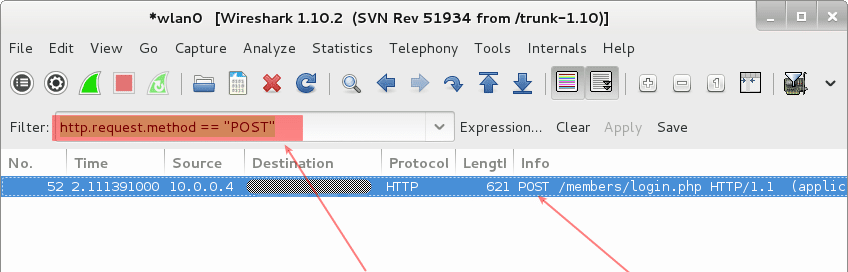
To filter all traffic and locate POST data, type in the following in the filter section
http.request.method == �POST�
See screenshot below. It is showing 1 POST event.
Website Password hacking using WireShark - blackMORE Ops - 3

Wednesday, 14 June 2017

Top 11 Firefox Add-ons a Hacker Must Have

11 Firefox Add-ons a Hacker Must Have


1. Tamper Data
Tamper data is a great tool to view and modify HTTP/HTTPS headers and post parameters. We can alter each request going from our machine to the destination host with this. It helps in security testing web applications by modifying POST parameters. It can be used in performing XSS and SQL Injection attacks by modifying header data.
Add Tamper data to Firefox:
https://addons.mozilla.org/en-us/firefox/addon/tamper-data/

2. Firebug
Firebug is a nice add-on that integrates a web development tool inside the browser. With this tool, you can edit and debug HTML, CSS, and JavaScript live on any webpage to see the effect of changes. It helps while analyzing JS files to find XSS vulnerabilities. It�s a very helpful add-on for finding DOM based XSS for security testing professionals.
Add Firebug to your browser:
https://addons.mozilla.org/en-US/firefox/addon/firebug/
 
3. Hackbar
Hackbar is a simple penetration tool for Firefox. It helps in testing simple SQL injection and XSS holes. You cannot execute standard exploits but you can easily use it to test whether or not vulnerability exists. You can also manually submit form data with GET or POST requests. It also has encryption and encoding tools. Most of the time, this tool helps while testing XSS vulnerability with encoded XSS payloads. It also supports keyboard shortcuts to perform various tasks. I am sure most people in the security field already know about this tool. Hackbar is mostly used in finding POST XSS vulnerabilities because it can send POST data manually to any page you like. With the ability to manually send POST form data, you can easily bypass client side validations. If your payload is being encoded at client side, you can use an encoding tool to encode your payload and then perform the attack. If the application is vulnerable to XSS, I am sure you will find the vulnerability with the help of the Hackbar add-on to Firefox browser.
Add Hackbar to Firefox:
https://addons.mozilla.org/en-US/firefox/addon/hackbar/

4. Cookies Manager 
Cookie Manager is one of the greatest tools ever created. Using this tool you can actually play with cookies. You can alter almost every cookie using this tool. You can use Cookies Manager to view, edit, and create new cookies. It also displays extra information about cookies, allowing you to edit multiple cookies at once and backup/restore them.
Add Cookies Manager to Firefox:
https://addons.mozilla.org/en-US/firefox/addon/cookies-manager-plus/

5. NoScript
No Script add-on is greatness beyond imagination. With this tool, you can monitor each and every script running on a website; you can block any of the scripts and see what each script actually does. But this add-on is for experts, newbies will face problems using this. Note: If you are testing XSS, HTTPS header modifications, or Injection attacks on any website, you need to disable this plugin first because it will block your efforts.
Add NoScript to Firefox:
https://addons.mozilla.org/en-us/firefox/addon/noscript/

6. Grease Monkey
Grease Monkey is the counter part to NoScript, its function is the exact opposite of Noscript. We use Noscript to block scripts and GreaseMonkey to run them. It allows you to customize the way a web page displays or behaves by using small bits of JavaScript. 
Add Grease Monkey to Firefox:
https://addons.mozilla.org/en-US/firefox/addon/greasemonkey/

7. User Agent Switcher

User Agent Switcher adds a one-click user agent switch to the browser, along with a menu and tool bar button. Whenever you want to switch the user agent, use the browser button. User Agent add-on helps in spoofing the browser while performing an attack.
Add User Agent Switcher to Firefox:
https://addons.mozilla.org/en-US/firefox/addon/user-agent-switcher/

8. CryptoFox
CryptoFox is an encryption or decryption tool for Mozilla Firefox. It supports most of the available encryption algorithms so you can easily encrypt or decrypt data with supported encryption algorithms. This add-on comes with dictionary attack support to crack MD5 cracking passwords. Although it hasn�t always had great reviews, it works satisfactorily.
Add CryptoFox to Firefox:
https://addons.mozilla.org/en-US/firefox/addon/cryptofox/

9. SQL Inject Me
SQL Inject Me is another nice Firefox add-on used to find SQL injection vulnerabilities in web applications. This tool does not exploit vulnerabilities but displays their existence. SQL injection is one of the most harmful web application vulnerabilities, it can allow attackers to view, modify, edit, add, or delete records in a database. This tool sends escape strings through form fields and searches database error messages. If it finds a database error message, it marks the page as vulnerable. Hackers can use this tool for SQL injection testing.
Add SQL Inject Me to Firefox:
https://addons.mozilla.org/en-us/firefox/addon/sql-inject-me/ 

10.  XSS ME
Cross Site Scripting is the most common web application vulnerability. This add-on is incredibly useful for detecting XSS vulnerabilities in web applications. XSS-Me is used to find reflected XSS vulnerabilities from a browser. It scans all forms of the page, and then performs an attack on selected pages with pre-defined XSS payloads. After the scan is complete, it lists all the pages that rendered a payload, and may be vulnerable to XSS attack. Then, you can manually test the web page to determine whether or not the vulnerability exists.
Add XSS ME to Firefox:
https://addons.mozilla.org/en-us/firefox/addon/xss-me/
 
11.  Passive Recon
Last but not the least, Passive Recon is an information gathering tool.
Passive Recon provides information security professionals the ability to perform �packetless� discoveries of target resources utilizing publicly available information. It gathers information in the same manner as DnsStuff tool, available on backtrack.

Add PassiveRecon to Firefox:
https://addons.mozilla.org/en-US/firefox/addon/passiverecon/


That�s all for today. I hope you�re enjoying your journey towards becoming a Professional Hacker. Have fun! Keep learning.
 
byrockstardevil


Monday, 12 June 2017

how to install nmap on windows

Installing Nmap on Windows


Step 1
Download the Windows version of Nmap from www.nmap.org.

Step 2
Launch the Nmap setup program. Select the default installation (recommended)
which will install the entire Nmap suite of utilities.

Step 3
During installation, a helper program called WinPcap will also be installed. WinPcap
is required for Nmap to function properly on the Windows platform so do not skip
this step.

Step 4
After the WinPcap installation has completed you are given the option to configure
its service settings. The default options will enable the WinPcap service to start
when Windows boots. This is recommended as Nmap will not function correctly
when the WinPcap service is not running.

 Step 5
Once Nmap has been successfully installed you can verify it is working correctly by
executing nmap scanme.insecure.org on the command line (located in Start >
Programs > Accessories > Command Prompt).

C:\>nmap -h