For this Web App, you Need to create a Four Files
1 - index.php
2 - userwish.php
3 - db.php
4 - .htaccess
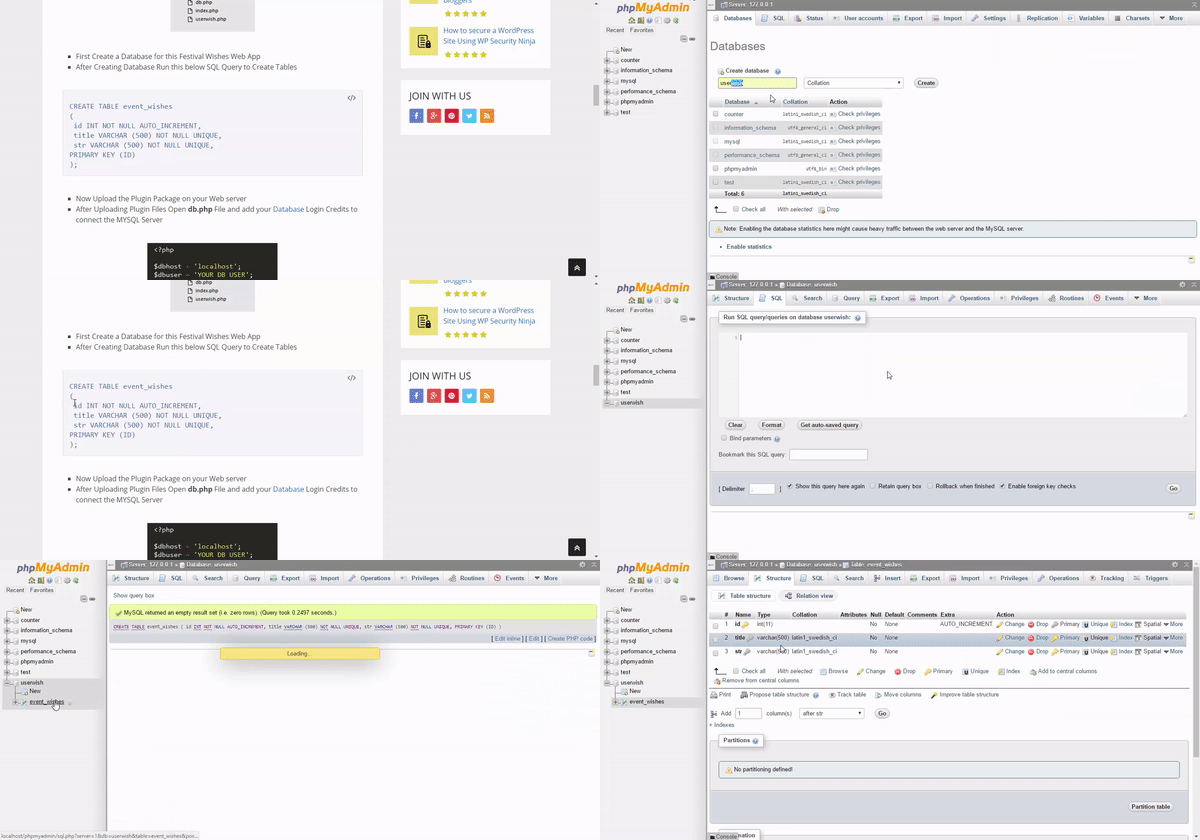
- First Create a Database on your Webserver
- After creating the Database run this SQL Query to create Tables for the Web App
CREATE TABLE event_wishes
(
 id INT NOT NULL AUTO_INCREMENT,
 title VARCHAR (500) NOT NULL UNIQUE,
 str VARCHAR (500) NOT NULL UNIQUE,
PRIMARY KEY (ID)
);
 27
27 - After creating Database Tables create Three files
- index.php - Homepage
- userwish.php - Greeting Page
- db.php - For MYSQL Database Connection
- Now Add this Below code on db.php File
        <?php

        $dbhost = 'localhost';
    $dbuser = 'YOUR DB USER';
    $dbpass = 'YOUR DB PASS';
    $dbname = 'YOUR DB NAME';

    $con=mysqli_connect($dbhost, $dbuser, $dbpass,$dbname) //connect to the database server
    or die ("Could not connect to mysql because ".mysqli_error());

    mysqli_select_db($con,$dbname)  //select the database
    or die ("Could not select to mysql because ".mysqli_error());

?><?php
/*
Plugin Name: MSK Festival Wishes Web App
Plugin URI: https://www.allwebtuts.com/festival-wishes-web-app/
Description: Festival Wishes Web App - A PHP Plugin Which Helps us to Create an Awesome SEO Friendly Festival Event Wishing Web App with Custom Greeting Wishes Page.
Version: 1.1
Author: Santhosh veer
Author URI: https://www.mskian.com
License: GPLv2 or later
License URI: http://www.gnu.org/licenses/gpl-2.0.html
*/
include('db.php');
if(isset($_POST['create-wish']))
{
$title=mysqli_real_escape_string($con,$_POST["title"]);
$title=htmlentities($title);
//friendly URL conversion
function to_prety_url($str){
if($str !== mb_convert_encoding( mb_convert_encoding($str, 'UTF-32', 'UTF-8'), 'UTF-8', 'UTF-32') )
$str = mb_convert_encoding($str, 'UTF-8', mb_detect_encoding($str));
$str = htmlentities($str, ENT_NOQUOTES, 'UTF-8');
$str = preg_replace('`&([a-z]{1,2})(acute|uml|circ|grave|ring|cedil|slash|tilde|caron|lig);`i', '\1', $str);
$str = html_entity_decode($str, ENT_NOQUOTES, 'UTF-8');
$str = preg_replace(array('`[^a-z0-9]`i','`[-]+`'), '-', $str);
$str = strtolower( trim($str, '-') );
return $str;
}
$str=to_prety_url($title);
// sql query for inserting data into database
$sql_query = "INSERT INTO event_wishes (title,str) VALUES ('$title','$str')";
$result_set=mysqli_query($con,$sql_query);
// Redirect to Greeting Page
//Replace http://localhost/$str with your Greeting WEB APP URL
header("Location: http://localhost/$str");
exit();
}
?>
<!DOCTYPE html>
<html lang="en" itemscope itemtype="http://schema.org/WebSite">
<head>
<meta charset="utf-8">
<meta http-equiv="X-UA-Compatible" content="IE=edge,chrome=1">
<meta name="viewport" content="width=device-width, initial-scale=1">
<?php $current_page = "http://$_SERVER[HTTP_HOST]$_SERVER[REQUEST_URI]";
echo '<link rel="canonical" href="'.$current_page.'" itemprop="url"/>'; ?>
<!-- Edit the Meta Tags Add your Own Meta Contents -->
<!-- Seo Meta Tags -->
<title>Mskian Festival Wishes Web App</title>
<meta name="description" content="Create an Awesome Name Wishing Festival Web App."/>
<meta name="robots" content="index,follow">
<link href='YOUR FAVICON URL' rel='icon' type='image/x-icon'/>
<!-- Twitter Card data -->
<meta name="twitter:card" content="summary">
<meta name="twitter:title" content="Mskian Festival Wishes Web App" />
<meta name="twitter:description" content="Create an Awesome Name Wishing Festival Web App." />
<meta name="twitter:image" content="THUMBNAIL IMAGE FOR TWITTER SHARE" />
<meta name="twitter:site" content="@yourtwitterusername" />
<meta name="twitter:creator" content="@yourtwitterusername" />
<!-- Facebook Open Graph data -->
<meta property="og:title" content="Mskian Festival Wishes Web App" />
<meta property="og:type" content="website"/>
<meta property="og:url" content="YOUR WEB APP URL" />
<meta property="og:image" content="THUMBNAIL IMAGE FOR FACEBOOK SHARE" />
<meta property="og:description" content="Create an Awesome Name Wishing Festival Web App." />
<meta property="og:site_name" content="YOUR SITE NAME" />
<meta property="fb:app_id" content="APP ID" />
<!-- Google+ Meta Tags. -->
<meta itemprop="name" content="Mskian Festival Wishes Web App">
<meta itemprop="description" content="Create an Awesome Name Wishing Festival Web App.">
<meta itemprop="image" content="THUMBNAIL IMAGE FOR GOOGLE+ SHARE">
<link href="https://maxcdn.bootstrapcdn.com/bootstrap/3.3.6/css/bootstrap.min.css" rel="stylesheet">
<link href='https://fonts.googleapis.com/css?family=Montserrat:400,700' rel='stylesheet' type='text/css'>
<style type="text/css">
body {
font-family: 'Montserrat', sans-serif;
font-size: 18px;
}
h1{
font-size: 2.3em;
font-weight: 600;
margin: 20px 0 10px 0;
letter-spacing: -1px;
}
.login-form {
margin: 0 auto !important;
float: none;
padding: 15px;
}
.login-form form.form-horizontal {
padding: 10px 20px;
}
.bold{
font-weight: 700;
}
</style>
<!-- HTML5 shim and Respond.js IE8 support of HTML5 elements and media queries -->
<!--[if lt IE 9]>
<script src="https://oss.maxcdn.com/libs/html5shiv/3.7.0/html5shiv.js"></script>
<script src="https://oss.maxcdn.com/libs/respond.js/1.3.0/respond.min.js"></script>
<![endif]-->
</head>
<body>
<br />
<br />
<div class="col-md-6 col-lg-5 col-sm-8 center-block well login-form">
<h2 class="no-margin text-center">Create Greeting</h2>
<div class="clearfix"> </div>
<form method="post" class="form-horizontal" data-parsley-validate>
<div class="form-group">
<input type="text" class="form-control" name="title" placeholder="Your Name" data-parsley-required="true">
</div>
<div class="form-group">
<button type="submit" name="create-wish" class="btn btn-success btn-block btn-lg">Create Wish</button>
</div>
</form>
</div>
</div>
<div class="clearfix"> </div>
<!-- JavaScript -->
<script src="https://ajax.googleapis.com/ajax/libs/jquery/1.11.3/jquery.min.js"></script>
<script src="https://maxcdn.bootstrapcdn.com/bootstrap/3.3.6/js/bootstrap.min.js"></script>
<script src="https://cdnjs.cloudflare.com/ajax/libs/parsley.js/2.5.1/parsley.min.js"></script>
</body>
</html>header("Location: http://localhost/$str");<?php
include("db.php");
$str=mysqli_real_escape_string($con,$_GET["str"]);
//Get data's from the Table
if(isset($str))
{
$sql_query="SELECT * FROM event_wishes WHERE str='$str'";
$result_set=mysqli_query($con,$sql_query) or die('error');
$user_wish=mysqli_fetch_array($result_set);
}
?>
<!DOCTYPE html>
<html lang="en" itemscope itemtype="http://schema.org/WebSite">
<head>
<meta charset="utf-8">
<meta http-equiv="X-UA-Compatible" content="IE=edge,chrome=1">
<meta name="viewport" content="width=device-width, initial-scale=1">
<?php $current_page = "http://$_SERVER[HTTP_HOST]$_SERVER[REQUEST_URI]";
echo '<link rel="canonical" href="'.$current_page.'" itemprop="url"/>'; ?>
<!-- Edit the Meta Tags Add your Own Meta Contents -->
<!-- Seo Meta Tags -->
<title><?php echo $user_wish['title']; ?> Wishing your happy independence day</title>
<meta name="description" content="<?php echo $user_wish['title']; ?> Wish you a happy independence day Here is your happy independence day Greeting Wishes."/>
<link href='YOUR FAVICON URL' rel='icon' type='image/x-icon'/>
<!-- Twitter Card data -->
<meta name="twitter:card" content="summary">
<meta name="twitter:title" content="<?php echo $user_wish['title']; ?> Wishing your happy independence day" />
<meta name="twitter:description" content="<?php echo $user_wish['title']; ?> Wish you a happy independence day Here is your happy independence day Greeting Wishes." />
<meta name="twitter:image" content="THUMBNAIL URL IMAGE FOR TWITTER SHARE" />
<meta name="twitter:site" content="@yourtwitterusername" />
<meta name="twitter:creator" content="@yourtwitterusername" />
<!-- Facebook Open Graph data -->
<meta property="og:title" content="<?php echo $user_wish['title']; ?> Wishing your happy independence day" />
<meta property="og:type" content="article"/>
<meta property="og:url" content="<?= "http://example.com".$_SERVER['REQUEST_URI']; ?>" />
<meta property="og:image" content="THUMBNAIL IMAGE URL FOR FACEBOOK SHARE" />
<meta property="og:description" content="<?php echo $user_wish['title']; ?> Wish you a happy independence day Here is your happy independence day Greeting Wishes." />
<meta property="og:site_name" content="YOUR SITE NAME" />
<meta property="fb:app_id" content="APP ID" />
<meta content='YOUR FACEBOOK PROFILE URL' property='article:author'/>
<meta property="article:publisher" content="YOUR FACEBOOK PAGE URL" />
<!-- Google+ Meta Tags. -->
<meta itemprop="name" content="<?php echo $user_wish['title']; ?> Wishing your happy independence day">
<meta itemprop="description" content="<?php echo $user_wish['title']; ?> Wish you a happy independence day Here is your happy independence day Greeting Wishes.">
<meta itemprop="image" content="THUMBNAIL IMAGE URL FOR GOOGLE+ SHARE">
<link href="https://maxcdn.bootstrapcdn.com/bootstrap/3.3.6/css/bootstrap.min.css" rel="stylesheet">
<link href='https://fonts.googleapis.com/css?family=Montserrat:400,700' rel='stylesheet' type='text/css'>
<style type="text/css">
body {
font-family: 'Montserrat', sans-serif;
font-size: 18px;
}
h1{
font-size: 2.3em;
font-weight: 600;
margin: 20px 0 10px 0;
letter-spacing: -1px;
}
.login-form {
margin: 0 auto !important;
float: none;
padding: 15px;
}
.login-form form.form-horizontal {
padding: 10px 20px;
}
.bold{
font-weight: 700;
}
</style>
<!-- HTML5 shim and Respond.js IE8 support of HTML5 elements and media queries -->
<!--[if lt IE 9]>
<script src="https://oss.maxcdn.com/libs/html5shiv/3.7.0/html5shiv.js"></script>
<script src="https://oss.maxcdn.com/libs/respond.js/1.3.0/respond.min.js"></script>
<![endif]-->
</head>
<body>
<br />
<br />
<h2 class="no-margin text-center">Hello <?php echo $user_wish['title']; ?> Wishing you a happy independence day :-) </h2>
<br />
<div class="col-md-6 col-lg-5 col-sm-8 center-block well login-form">
<h2 class="no-margin text-center">Create Your Own Greeting Wish Like this</h2>
<div class="clearfix"> </div>
<form method="post" action="index.php" class="form-horizontal" data-parsley-validate>
<div class="form-group">
<input type="text" class="form-control" name="title" placeholder="Your Name" data-parsley-required="true">
</div>
<div class="form-group">
<button type="submit" name="create-wish" class="btn btn-success btn-block btn-lg">Create Wish</button>
</div>
</form>
</div>
</div>
<div class="clearfix"> </div>
<!-- JavaScript -->
<script src="https://ajax.googleapis.com/ajax/libs/jquery/1.11.3/jquery.min.js"></script>
<script src="https://maxcdn.bootstrapcdn.com/bootstrap/3.3.6/js/bootstrap.min.js"></script>
<script src="https://cdnjs.cloudflare.com/ajax/libs/parsley.js/2.5.1/parsley.min.js"></script>
</body>
</html>- Now Find this Below line on userwish.php
<form method="post" action=index.php class="form-horizontal" data-parsley-validate>- Replace index.php With your Festival Wishes Web App Homepage URL
- Add this Rule on HTACCESS File for SEO Friendly URL
RewriteEngine On
RewriteRule ^([a-zA-Z0-9_-]+)$ userwish.php?str=$1 - That's all successfully we created a Festival Wishing Web App
All the user's data are Saved in Database
Recommended PHP Version 5.6 and 7
Database Extension - MYSQLI
DB Support - MYSQL 5.6, MARIA DB 10 and Latest versions

